
You can easily track every question, assign tasks to your team, and reply faster. This tool saves time, reduces stress, and helps you stay professional.
It also keeps a clear record of all conversations, so no issue slips through. Whether you’re a solopreneur or managing a team, Kartra’s Helpdesk gives you total control.
In this guide, you’ll learn how to set up, manage, and get the most from Kartra’s Helpdesk to support your customers effectively.

How Customer Support Impacts Your Business Success
Strong customer support can make or break your online business. When customers feel heard and helped quickly, they stick around longer.
But when support is slow or messy, they often move to competitors. That’s why managing customer care effectively is vital for lasting success.
Builds Trust and Loyalty
Good support shows customers that you care about their experience. It builds trust and encourages them to return for future purchases. A fast, friendly response often turns a frustrated customer into a loyal fan.
Avoids Frustration and Lost Sales
A disorganized system causes confusion and delays. Missed messages or unanswered tickets quickly damage your reputation. Customers want simple, clear communication without repeating themselves multiple times.
Why Kartra Helpdesk Matters
Kartra’s Helpdesk keeps every support request in one dashboard. You can reply faster, assign tickets, and track responses easily. This organization saves time and ensures every customer gets proper attention.

Accessing Kartra’s Helpdesk
Getting started with Kartra’s Helpdesk is quick and beginner-friendly. You’ll find everything neatly arranged inside your main dashboard.
Follow these steps to access and manage your customer tickets smoothly.
Step 1: Log in to Your Account
Go to your Kartra login page and enter your credentials. Once inside, you’ll see the main navigation panel.
Step 2: Open the Helpdesk Tab
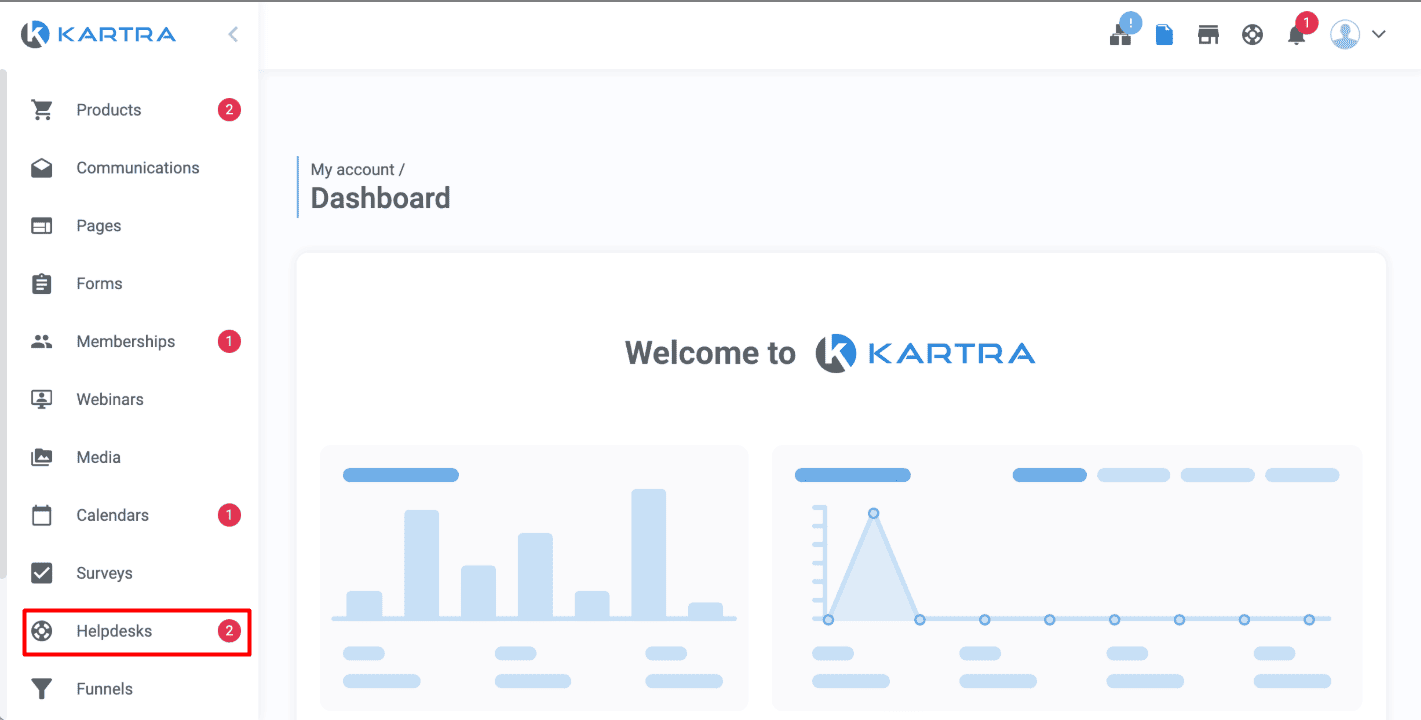
Click on the “Helpdesk” tab in the main menu. This opens the full support area.
Step 3: View and Manage Tickets
From here, you can view open tickets, respond directly, or change settings. It’s simple, clean, and designed for quick actions.
Setting Up Your First Support Ticket System
A ticketing system helps organize every customer inquiry in one place. Each ticket represents a single request, making it easy to track conversations.
Kartra makes setup simple, even if you’re new to customer support tools. Follow these steps to launch your first helpdesk quickly.
Step 1: Create Your Helpdesk
Go to the Helpdesk section and click “New Helpdesk.” You might also see an option called “Create Ticket System.” This begins your setup process.
Choose a clear name like “Customer Support” or “Orders Helpdesk.” A descriptive name helps staff and customers know where to reach out.

Kartra makes it simple to reply directly from your dashboard. Follow these steps to handle tickets efficiently.
Step 1: Open the Ticket
Go to your Helpdesk dashboard and open the ticket you want to address. Review the subject and category to understand the request type before replying.
Step 2: Read Carefully
Take a moment to read the full message. Understanding the customer’s issue before responding helps you craft a more accurate solution.
Step 3: Write Your Reply
Use clear, friendly language when replying. Focus on solving the problem without overcomplicating things. Keep your tone helpful and professional.
Step 4: Stay Solution-Focused
Always end your message with a clear action or resolution. For example, provide a link, confirm an update, or explain the next step.
Friendly, timely replies show customers that your brand truly cares about their experience.

Using Knowledge Base Integration
Kartra’s Helpdesk includes a built-in Knowledge Base feature that boosts self-service. It allows customers to find answers without waiting for your reply.
You can link FAQs, tutorials, and how-to guides directly to your Helpdesk. This reduces ticket volume and improves response speed.
Tips:
- Include solutions to common issues customers often ask about.
- Add images or short videos to make tutorials easier to follow.
- Update your Knowledge Base regularly based on new support trends.
This proactive approach helps customers feel empowered while saving your team valuable time.

Tracking and Managing Performance
Once your Helpdesk is running, tracking performance helps you stay consistent. Kartra’s analytics tools show how well your support team handles requests.
These insights help you improve efficiency, customer satisfaction, and overall service quality. Let’s explore how to use them effectively.
Monitor Key Metrics
Kartra Helpdesk provides detailed analytics for every ticket interaction. You can track response times, resolution rates, and customer satisfaction scores easily.
These numbers reveal how quickly your team replies and how effectively they resolve issues. Shorter response times often lead to happier, more loyal customers.
You can also measure how many tickets are handled daily or weekly. It helps you plan and assign resources efficiently. Consistent monitoring ensures no request slips through the cracks.