

Getting it right ensures your website looks professional and credible to everyone. Many beginners think registration is complicated, but it’s actually very simple.
You just need to follow the right steps in the right order. This guide breaks it all down clearly, so you don’t feel lost.
We’ll cover everything, from checking name availability to completing registration online. Let’s start building your online presence with a name that truly represents you.

The Importance of Registering Your Domain
Your domain name is more than a web address; it’s your identity online. It helps customers find you, trust you, and remember your business easily. Without it, your brand won’t look professional or credible to visitors.
Protects Your Brand
Registering your domain ensures no one else can claim your business name. It keeps your brand unique and prevents others from copying your identity. Once registered, your name becomes yours to use and promote confidently.
Builds Credibility and Trust
People trust websites that have their own domain, not free ones. It shows commitment and professionalism, which attracts serious customers and partners. You can also create branded email addresses for a more polished image.
Avoid Losing Your Name
If you skip registration, someone else might grab your desired name. Once taken, it’s often expensive or impossible to reclaim it later. Registering early keeps your brand safe and ready for growth.

Brainstorm and Choose Your Domain Name
Before registering, spend time choosing a name that fits your business. The right domain makes your brand memorable and easy to promote.
Keep It Short and Simple
Short names are easier to type, spell, and remember for everyone. Avoid long phrases, hyphens, or complicated spellings that confuse potential visitors.

Make It Relevant
Choose words that reflect your niche, industry, or product focus clearly. Relevant names help people instantly understand what your business is about.
Think Long-Term
Pick a name flexible enough for future products or expansion. A well-thought-out domain today saves rebranding costs later as you grow.

Check Domain Availability
Once you’ve chosen your name, check if it’s available for registration. Your domain must be unique and not already owned by another business. This step helps avoid confusion and legal trouble down the road.









Tips to Check Availability:
- Use trusted tools from HostGator, DreamHost, WP Engine, or SiteGround.
- These sites let you search and register instantly if your name is free.
- If your first choice is taken, try small variations that still fit.
- Consider alternate spellings, slight word changes, or different extensions if needed.
- Always make sure the new version remains simple and easy to remember.
Checking availability early prevents disappointment and keeps your launch plan on track.
Once you find the perfect match, secure it immediately before someone else does.
Choose a Domain Extension
Your domain extension appears after your name and affects your credibility. Different extensions serve different purposes and signal trust in unique ways.
| Extension | Best For | Why It Matters |
| .com | Businesses | Most trusted and widely recognized worldwide. |
| .net | Tech brands | Works for digital or networking-based companies. |
| .org | Nonprofits | Great for charities or organizations building trust. |
| Niche extensions | Specific industries | Examples: .shop, .design, or .store for clarity. |
Tip: Always choose .com when possible; it’s easiest to remember and share. Use niche extensions only when they genuinely align with your brand’s purpose.
Register Through a Trusted Hosting Company
Once you’ve chosen your domain name, it’s time to register it officially. Doing this through a reliable hosting company ensures security and a smooth setup. These companies make the process simple even for first-time website owners.
Step 1: Visit a Hosting Provider
Go to the website of a trusted hosting company like HostGator, DreamHost, WP Engine, or SiteGround.These platforms offer both domain registration and website hosting services.
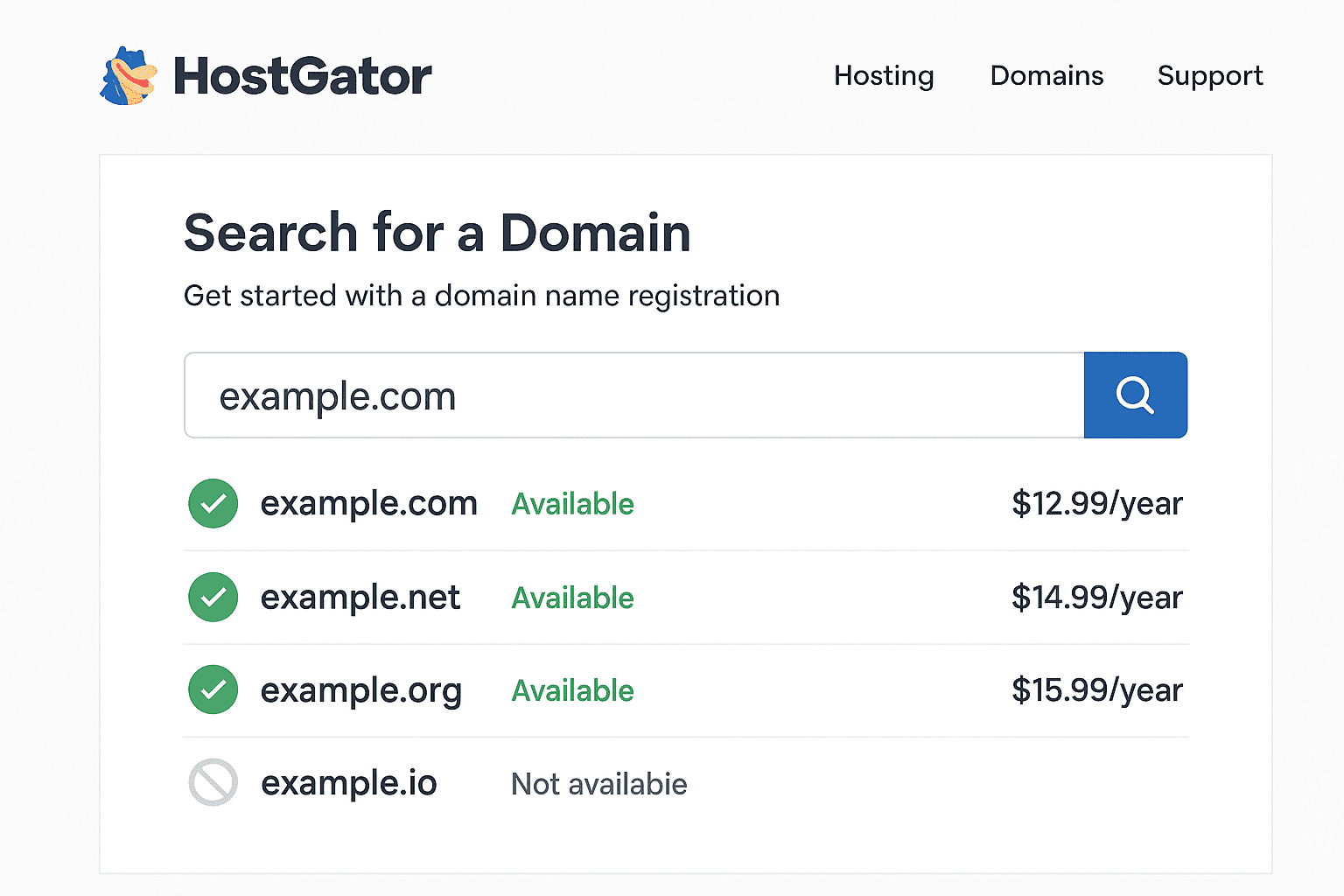
Step 2: Search Your Domain
Use their search tool to check if your desired domain is available. If it’s taken, they’ll show suggestions with slight variations or new extensions.
Step 3: Add to Cart
Once you find your perfect match, click “Add to Cart” to continue. You can also bundle hosting plans if you’re ready to build your site.
Step 4: Complete Checkout
Enter your contact details, payment info, and choose your registration duration. Most providers allow you to register for one to three years easily. After checkout, your domain is yours, ready to connect to your website.
Double Check and Confirm Your Registration
Before finalizing, review all details carefully to avoid costly mistakes later. Once you confirm, changing spelling or details can be difficult or expensive.
Check Spelling and Accuracy
Make sure your domain is spelled exactly how you want it displayed. A small typo could mean losing the name you worked hard for.
Confirm Registration Period
Choose a registration length; typically 1, 2, or 3 years total. Longer terms can sometimes save money and prevent accidental expiration issues.
Save Confirmation Details
After purchase, save your confirmation email and login information securely. This ensures you can access your account, renew, or manage settings anytime.

Set Up Your Domain for Your Website
Setting up your domain is the next important step after registration. A proper connection ensures your website is accessible online.
Keeping everything organized helps you stay in control of your online identity. Follow these simple steps to link your domain to your website.
Connect Your Domain to Your Website
After registering, log in to your hosting account. Locate the domain management section on your hosting dashboard.
Follow your hosting company’s instructions to link the domain. Use the domain’s DNS settings to point it to your site.
Use Hosting Guides for Assistance
Most hosting providers offer detailed guides for beginners. These guides explain domain pointing, DNS configuration, and setup steps. Following them carefully reduces errors and ensures faster connection.
One-Click Website Setup
Many hosts provide one-click installations for WordPress or builders. This simplifies linking your domain to a fully functional website.
Choose your preferred website builder during the setup process. One-click setup automatically configures domain settings for smooth operation.
Test Your Domain Connection
After setup, check if your website loads correctly. Visit your domain in a browser to confirm everything works.
Clear your cache if changes do not appear immediately. Contact hosting support if the website fails to load properly.
Keep Domain Information Updated
Ensure your contact details are current in the domain settings. Renew your domain before it expires to avoid downtime.
Regularly monitor domain status to prevent accidental disconnections. Connecting your domain properly creates a strong foundation for your website.
It ensures visitors can find your content reliably and quickly. Proper setup saves time and avoids technical issues later.
Conclusion
Registering your domain is the first step to an online business. It gives your brand a unique identity on the internet. Without a domain, your website cannot be found by potential visitors.
Choose a trusted hosting provider to ensure smooth website operation. Options like HostGator, DreamHost, WP Engine, or SiteGround work well.
These providers simplify domain connection and website setup for beginners. Acting quickly secures your preferred domain before someone else takes it.
A registered domain builds credibility and trust with your audience. It also lays the foundation for email addresses tied to your brand.
Once your domain is ready, you can start building your website. Add content, design pages, and set up online services with ease.
Remember, every successful online business starts with owning a strong domain. Take action today to claim your domain and start building success.